Mastering the Pink Text Effect Valentine 3D Style for Stunning Graphic Designs
In the vibrant world of digital design, few aesthetics capture attention quite like the romantic and playful charm of a Pink Text Effect Valentine 3D Style. Whether you are creating social media graphics for the upcoming holiday season, designing wedding invitations, or crafting marketing materials for a beauty brand, having access to high-quality, editable text effects can transform a simple message into a visual masterpiece. This guide explores the intricacies of this specific design asset, explaining how it works, why it is valuable for creators, and how you can leverage it to elevate your Adobe Illustrator projects.
Understanding the Core Concept: What Is This Text Effect?
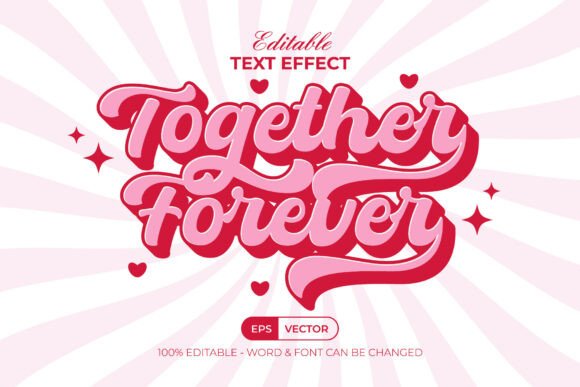
At its heart, the Pink Text Effect Valentine 3D Style is not a font in the traditional sense. Instead, it is a sophisticated set of graphic styles designed specifically for Adobe Illustrator. Many beginners often confuse fonts with text effects, leading to frustration when they cannot find the "font" in their system library. It is crucial to understand that this item is a design template applied to existing text or shapes.
This resource functions as a pre-built style within the Graphic Styles menu. The process is streamlined for efficiency: you simply type your desired text, select it, and apply the style from the menu. Instantly, your flat, two-dimensional letters are transformed into a three-dimensional, pink-hued masterpiece complete with shadows, highlights, and depth. This distinction is vital because it means the underlying typography remains fully editable. You can change the wording, the font family, or the size at any time without breaking the complex 3D structure.
The Practical Benefits for Modern Designers
Why should designers, both amateur and professional, incorporate tools like this into their workflow? The primary advantage lies in time management and consistency. Creating a 3D text effect from scratch involves manipulating paths, applying gradients, adjusting blend modes, and managing complex layer hierarchies. For a beginner, this can take hours. With the Pink Text Effect Valentine 3D Style, that same result is achieved in seconds.
Beyond speed, these assets offer a level of polish that might be difficult to replicate manually without extensive training. The design features well-organized layers and RGB color profiles, ensuring that the colors appear vibrant on digital screens. In an era where visual content dominates social media platforms like Instagram and Pinterest, having a quick way to generate eye-catching headers and quotes can significantly boost engagement.
Key Features That Set This Asset Apart
- Easy to Edit: The most significant feature is the non-destructive nature of the edit. Because the effect is applied via the Graphic Styles menu, the original text object remains intact. You can retype words instantly while retaining the 3D look.
- Well-Organized Layers: Professional organization ensures that if you need to tweak a specific shadow or highlight, you can do so without navigating through a chaotic mess of anchor points.
- 100% Editable Text and Font: Unlike some rasterized effects, this allows for total flexibility. You can swap the included free font for any other typeface in your library.
- RGB Color Mode: Optimized for screen display, ensuring that the pinks and reds pop correctly on websites, apps, and digital ads.
- Free Font Used: The package includes links to download the specific free fonts used in the preview, removing barriers to entry for users who may not have premium font libraries.
How to Use the Pink Text Effect in Your Workflow
Integrating this tool into your creative process is straightforward, provided you have Adobe Illustrator CC or a later version. The compatibility ensures that all modern features, such as live effects and advanced blending, function correctly. Here is a step-by-step breakdown of how to utilize this asset effectively:
- Download and Install: Begin by downloading the package, which typically includes an EPS file, an AI file, a JPEG preview, and a Read Me text file containing font links.
- Open the Source File: Open the AI file in Adobe Illustrator. Navigate to the Graphic Styles panel (usually found under Window > Graphic Styles).
- Create Your Base Text: Select the Type Tool and type your message. Choose a font that complements the 3D style—often rounded or script fonts work best for Valentine's themes.
- Apply the Style: With your text selected, click on the "Pink Text Effect Valentine 3D Style" swatch in the Graphic Styles panel. Watch as the flat text transforms instantly.
- Customize: If you wish to change the text, simply double-click the text box and retype. The 3D effect will automatically adjust to fit the new characters.
Clarifying Common Misunderstandings
A frequent point of confusion for new users is the assumption that purchasing or downloading this item grants them a new font file that can be installed on their computer. As mentioned earlier, this is a graphic style effect, not a font. If you attempt to use this style in Photoshop or a web editor that does not support Illustrator's specific graphic style architecture, it will not work. It is strictly an Adobe Illustrator asset.
Another common misconception is regarding the color mode. Some users expect CMYK values for print immediately upon opening the file. However, this specific design is optimized for RGB color, making it ideal for digital marketing, social media posts, and web banners. If you intend to use this for physical printing, you may need to convert the document to CMYK mode and check that the bright pinks translate well to ink, as neon and pastel shades can sometimes shift during the printing process.
Real-World Applications and Creative Possibilities
The versatility of the Pink Text Effect Valentine 3D Style extends far beyond just February 14th. While the aesthetic is inherently romantic, the underlying technique of 3D text styling is applicable across various industries.
Social Media Marketing: Brands often struggle to create unique graphics for every post. Using this effect, a business can quickly generate a series of quote cards, sale announcements, or product highlights that stand out in a crowded feed. The 3D depth adds a tactile quality that flat text lacks, encouraging users to pause and read.
Event Planning: For event planners organizing weddings, baby showers, or birthday parties, this style offers a quick way to mock up signage, banners, and digital invitations. The ability to easily edit the text means you can update names and dates instantly without redesigning the entire layout.
Educational Content: Teachers and content creators can use this style to make learning materials more engaging. A header saying "Valentine's Day Math Problems" in a fun 3D pink style can make a worksheet feel less intimidating and more festive for students.
The Importance of Organization in Digital Assets
One aspect that separates professional-grade assets from amateur ones is organization. The Pink Text Effect Valentine 3D Style emphasizes well-organized layers. In complex vector illustrations, layers can become a tangled web of paths and masks. When an asset is poorly organized, making even a small change—like moving a shadow slightly—can break the entire design.
By using a pre-organized file, you save yourself from potential technical headaches. This adherence to best practices in file structure reflects the E-E-A-T (Experience, Expertise, Authoritativeness, and Trustworthiness) principles of quality digital resources. It shows that the creator understands the needs of the end-user and has taken the time to ensure the file is robust, reliable, and easy to manipulate.
Conclusion: Elevating Your Creative Output
In summary, the Pink Text Effect Valentine 3D Style is more than just a pretty graphic; it is a powerful tool for efficient and effective design. By understanding that it is a graphic style rather than a font, and by leveraging its editable nature, you can unlock a world of creative possibilities within Adobe Illustrator. Whether you are a seasoned designer looking to speed up your workflow or a beginner eager to create professional-looking art, this asset provides the perfect balance of ease-of-use and high-quality output.
Remember to always check the included "Read Me" text file for font download links and specific instructions, as these details ensure the best possible result. With the right tools and a clear understanding of how they function, you can turn simple words into memorable visual experiences that resonate with your audience. Happy designing!