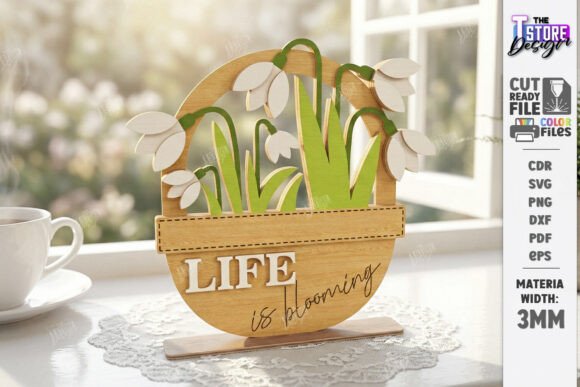
3D Spring Flower Laser Cut Floral SVG: A Workflow for Professional Home Decor
The transition from digital design to physical product is where creativity meets precision. For makers, small business owners, and hobbyists utilizing laser cutting technology, the 3D Spring Flower Laser Cut Floral SVG bundle represents more than just a collection of files; it is a complete toolkit for executing seasonal decor projects with efficiency and consistency. Whether you are preparing for an Easter table centerpiece, crafting a Mother's Day gift, or stocking inventory for a spring garden sale, understanding how to integrate these specific assets into your production workflow is essential for high-quality outcomes.
This digital product is engineered specifically for compatibility with modern laser cutting machines. It includes a comprehensive set of formats—SVG, EPS, PNG, PDF, and DXF—ensuring that regardless of your preferred software environment, you have the necessary data to proceed. The core value lies in the structured layering system: red lines indicate cut paths, while black lines designate engrave areas. This color-coded logic streamlines the preparation phase, reducing setup time and minimizing errors during the actual cutting process.
Integrating Digital Assets into Your Production Pipeline
Successful laser cutting projects begin long before the machine powers on. The integration of the 3D Spring Flower Laser Cut Floral Table Decor files into your workflow starts with project planning and material selection. When you download the zip archive, you gain access to versatile designs including standing signs, wooden flower pots, watering cans, and floral arrangements like tulips and sunflowers. These elements are not isolated graphics but components designed to work together in a cohesive assembly.
In a professional setting, the first step involves verifying file compatibility. While the bundle provides multiple formats, the SVG file is often the most robust choice for vector-based design software like Adobe Illustrator, CorelDRAW, or LightBurn. The ability to manipulate individual layers allows for precise adjustments to size and spacing without losing resolution. Before committing to expensive materials such as birch plywood or basswood, it is prudent to run a test cut on scrap material. This quality control measure ensures that the kerf width—the amount of material removed by the laser—is accounted for in the 3D assembly joints.
The distinction between cut and engrave lines is critical during the software setup phase. In your laser software, you must assign different power and speed settings to the red and black vectors. Typically, the red cut lines require higher power and slower speeds to penetrate the wood fully, whereas the black engrave lines need lower power and faster speeds to create surface texture without burning through. Misinterpreting these colors can lead to wasted materials and failed assemblies. By treating the file structure as a technical blueprint rather than just an image, you align your digital preparation with physical execution.
Strategic Applications for Seasonal Markets
The versatility of this bundle makes it particularly valuable for targeting specific seasonal markets. The inclusion of Easter Decor SVG elements and Mother's Day Gift options allows creators to pivot their production schedule to meet high-demand periods. For instance, the "Hello Spring Standing Signs" and "Watering Can" designs are ideal for retail environments or online shops looking to refresh their inventory ahead of the season.
When planning a batch production run, consider the modularity of the designs. The Glowforge Shelf Sitter Bundle components can be produced individually or combined into larger sets. A small business owner might produce a mix of single flower pots and full centerpiece arrangements to cater to different price points. The tulip and sunflower laser files offer distinct aesthetic options, enabling customers to choose between bold, sunny blooms or delicate, elegant petals. This variety increases the perceived value of the product line and encourages repeat purchases.
Furthermore, the 3D nature of these designs adds a tactile dimension that flat decals cannot achieve. The layered construction creates depth and shadow, making the final piece stand out on a shelf or dining table. This physical quality is a significant selling point for home décor enthusiasts who appreciate craftsmanship. By focusing on the assembly process as part of the value proposition, you can market these items not just as decorations, but as interactive DIY kits or premium finished goods.
Optimizing Material Usage and Assembly Efficiency
Efficiency in laser cutting is heavily dependent on nesting and material optimization. The Spring Garden Watering Can Laser Ready and other shapes in the bundle should be arranged within your software workspace to minimize waste. Many users find that creating a custom nesting layout for the specific dimensions of their wood sheets yields better results than relying on default auto-nesting features. This manual approach ensures that intricate parts, such as the petals of the 3D flowers, are placed away from the edges where they might be compromised by uneven material thickness.
Assembly is another critical stage where workflow decisions impact the final product. Since these are 3D laser cut files, the pieces are designed to slot together. Precision is paramount here; if the cut lines are slightly off due to incorrect machine calibration, the joints will be loose or impossible to assemble. Using a consistent adhesive strategy, such as wood glue applied sparingly to the tabs, ensures a clean finish without visible residue. For those offering these as kits, clear instructions on assembly order become part of the product deliverable.
Long-term usability of these files also depends on proper organization. Once the initial project is complete, storing the original SVG, EPS, and DXF files in a dedicated project folder allows for easy replication. If a customer requests a custom color size for the PNG preview or a different file format, having the source files readily available enables quick responses. The flexibility to modify the design—for example, resizing the wooden flower pot to fit a specific vase—extends the lifespan of the asset beyond its initial use case.
Ensuring Compatibility and Technical Support
While the bundle is designed for broad compatibility, every laser cutting machine operates differently. Factors such as lens type, bed size, and maximum power output influence how the files translate into physical cuts. It is essential to understand that the "Red line – CUT, Black line – ENGRAVE" convention is a standard industry practice, but your specific software may require you to manually reassign colors or attributes if the import process alters them.
If you encounter issues with file conversion or machine settings, the support channel provided by the creator is a vital resource. The option to request alternative file types or specific PNG dimensions demonstrates a commitment to user success. Engaging with the seller early in the process, especially if you are using niche software or non-standard materials, can prevent costly trial-and-error phases. This proactive communication fosters a reliable supply chain for digital assets, ensuring that your creative vision is not hindered by technical barriers.
Ultimately, the 3D Spring Flower Laser Cut Floral SVG bundle serves as a bridge between digital creativity and tangible artistry. By approaching the files with a methodical mindset—planning your layout, calibrating your machine, and optimizing your assembly process—you transform simple vector graphics into high-value products. Whether you are a seasoned entrepreneur scaling up for the holiday season or a hobbyist exploring new techniques, these tools provide the foundation for consistent, professional-grade results.
As you integrate these resources into your routine, remember that the quality of the final output is a reflection of the care taken in every preceding step. From the initial download to the final polish of the wooden flower pot, each decision contributes to the overall success of the project. Embracing this structured approach not only enhances your current work but also builds a scalable framework for future creative endeavors.